You've set up WhatsApp, connected your number, and you're ready to reach your customers. Then you hit the wall: 250 unique customers a day. For a growing business in Saudi Arabia or the wider MENA region, that's nowhere near enough.
The single most important step to breaking past it is Meta Business Verification.
The process itself is simple, but it's strict. This guide covers exactly what Meta requires, the Saudi and MENA specific details that trip people up, and how to pass the first time.
If you're still setting up, start with How to Set Up Your WhatsApp Business Account and Connect It to Arsel. For how verification fits into raising your limit, see WhatsApp Messaging Limits and Template Types.
Why verification raises your sending limit
Every new WhatsApp Business account starts at a messaging limit of 250 unique customers per rolling 24 hours. Meta doesn't let you buy your way up or simply apply.
It raises your limit automatically once you meet its criteria, and Business Verification is the gate that lets scaling begin. Once you're verified and sending quality messages, your limit climbs through the tiers (250, then 2,000, then 10,000, then 100,000, then unlimited) on its own.
One clarification that saves confusion: Business Verification is not the green or blue "verified" tick. Verification is the behind-the-scenes KYC step that unlocks your limits, and every serious sender needs it. The tick (the Official Business Account badge) is a separate, optional prestige badge. You need verification. You don't need the tick to send.
The three documents Meta requires
Meta asks for three documents to confirm your business. Each has specific rules, and in Saudi Arabia and MENA, a few local details matter a lot.
1. Proof of company name
The document must show your company name exactly as it's officially registered. Even a small spelling difference, such as an extra space, a missing word, or "Co." instead of "Company," can get you rejected.
- Best option in KSA: your Commercial Registration (CR / السجل التجاري). It's the cleanest proof of the registered name, so lead with it.
- Across MENA: the equivalent is your official trade license or commercial register extract, for example a trade license in the UAE, or the السجل التجاري in Egypt.
2. Proof of company address
The document must show your company name exactly as registered, plus the company address. Accepted options include:
- A VAT certificate (in KSA, issued by ZATCA / شهادة ضريبة القيمة المضافة)
- A utility bill
- A bank statement
Important for Saudi businesses: the Saudi National Address (العنوان الوطني) is not accepted by Meta as proof of address. This catches a lot of companies out, so don't submit it. Use a VAT certificate, utility bill, or bank statement instead.
3. Proof of company phone number
The document must show your company name exactly as registered, plus the company phone number. This is the one most businesses struggle with, so read carefully:
- It must be a utility bill or a bank statement. Line contracts, IBAN letters, and other contracts are not accepted.
- The name language must match. If your legal name is registered in Arabic but the document shows it only in English, it will be rejected. Consistency between your registration and your documents is everything.
- The practical catch: most Saudi banks don't print a phone number on their statements. So the easiest route is to get a business line from a telecom provider (STC, Mobily, or Zain) and submit that bill. It shows your company name and the phone number together.
The golden rule: your company name must match, everywhere
If you take one thing from this guide, make it this: your company name must be identical across all three documents and your Meta account, with the same spelling, the same words, and the same language.
The number-one cause of rejection isn't a missing document. It's a name that doesn't match exactly.
In the MENA region this is especially easy to get wrong, because companies are often registered with an Arabic legal name while some documents or systems show an English version.
Meta treats those as different names. Before you submit, check that the name on your CR, your address proof, your phone proof, and your Meta Business Portfolio all read exactly the same.
How the verification process works
- Gather your three documents and confirm the company name is identical on every one.
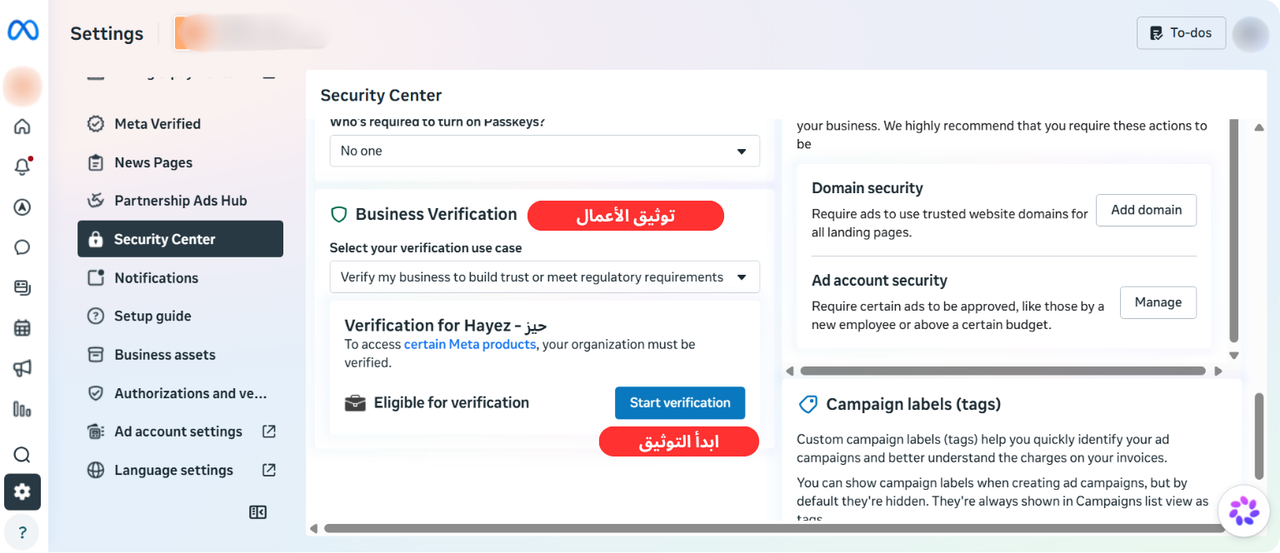
- Open your Meta Business Portfolio and go to the Security Center (Business Settings, then Security Center), where you'll find the Business Verification section.
- Enter your business details exactly as registered, and upload your three documents.
- Submit and wait for review. Meta's review can take anywhere from a day to a few business days. If it's rejected, the reason is usually a name or document-type mismatch. Fix it and resubmit.
Common reasons Meta verification gets rejected
Most rejections come down to a handful of avoidable mistakes:
- A name mismatch: different spelling, spacing, or wording across documents (the most common by far).
- Arabic vs. English name: the legal name registered in Arabic but shown in English on a document.
- Submitting the Saudi National Address as proof of address (Meta doesn't accept it).
- Wrong document type for the phone proof: a line contract or IBAN letter instead of a utility bill or bank statement.
- No phone number on the document: a bank statement that doesn't display the company phone number.
Frequently asked questions
1- Why do I need Meta Business Verification for WhatsApp? It's the step that unlocks higher messaging limits. Every WhatsApp Business account starts capped at 250 unique customers per day, and Meta only scales you up after you're verified and sending quality messages. Without verification, you stay at the starting tier no matter how well you send.
2- Why does Meta keep rejecting my verification? Almost always a name mismatch. The company name must be identical in spelling, spacing, and language across every document and your Meta account. In MENA, a common cause is a legal name registered in Arabic but shown in English on a document. The Saudi National Address and wrong document types (line contracts, IBAN letters) are other frequent rejection reasons.
3- Is the Saudi National Address accepted by Meta? No. Meta does not accept the Saudi National Address (العنوان الوطني) as proof of company address. Use a VAT certificate, a utility bill, or a bank statement that shows your registered company name and address instead.